Papá Noel Santa Claus
|
| |
Material Material |  |
| Filtros Filters | Xero Xero |
| FM Tile Tools FM Tile Tools |

Este tutorial fue hecho con el Psp X2, puede hacerlo con cualquier versión del Psp This tutorial was done with the PSP X2, you can do with any version of Psp |
1. Abrir una imagen transparente de 700 x 500 pixeles. Open a transparent image of 700 x 500 pixels. Con el bote de pintura la llenaremos de color#b4b2c0 Paint the pot with the colorful b4b2c0 # |
2. Selecciones/ Seleccionar todo. 2. Selections / Select All. |
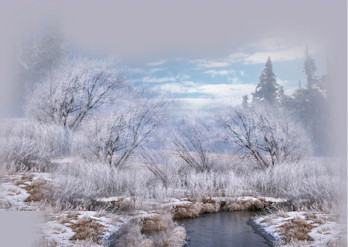
3. Abrir el tube mds7687 Winterscene. Open tube mds7687 Winterscene. Copiar/ Pegar en la selección. Copy / Paste into selection. |
4. Selecciones/ Anular selección. Selections / Cancel selection. |
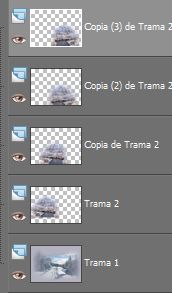
5. Abrir el tube y-outdoor13. Open-tube and outdoor13. Copiar/ Pegar como nueva capa. Copy / Paste as new layer. Duplicar. Duplicate. Colocar. Place. Duplicar. Duplicate. Espejo. Mirror. Colocar. Place. Duplicar. Duplicate. Colocar. Place. |
|
6. Abrir el tube indiansummer-sandi . Copiar/ Pegar como nueva capa. Colocar. 6. Open-tube indiansummer Sandi. Copy / Paste as new layer. Place. |
7. Capas/ Organizar. Layers / Arrange. |
|
8. Capas/ Fusionar/ Fusionar todo aplanar. Layers / Merge / Merge all flatten. |
9. Mejorar foto/ Eliminación de ruido en un paso. Improve photo / Removal of noise in one step. |
10. Abrir el tube 1197698270_fa07080. Open 1197698270_fa07080 tube. Con la herramienta lazo bordear la figura del niño. To the selection round the figure of the child. |
11. Copiar/ Pegar como nueva capa. Copy / Paste as new layer. Limpiar el tube. Clean the tube. Redimensionar 75%. Resize 75%. Colocar. Place. |
12. 12. Abrir el Tube y-outdoor13. Open-Tube and outdoor13. Copiar/ Pegar como nueva capa.Colocar abajo a la derecha. Copy / Paste as new capa.Colocar lower right. Duplicar, colocar abajo a la izquierda Duplicate, settle down to the left |
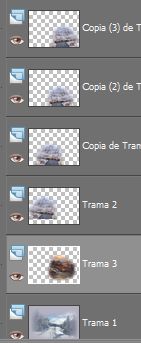
13. Organizar las capas. Organize layers. Nos quedarán así: We will be as follows: |
|
14. Cerramos la capa de fondo. We closed the background layer. Fusionar visibles. Merge visible. |
15. Con la Herramienta Pincel Pintar retocaremos la imagen del niño. Paint Brush tool with the aim of image of the child. |
16. Efectos/ Plugins/ Xero/ Porcelain 50/128/128 Effects / Plugins / Xero / Porcelain 50/128/128 |
17. Duplicar capa. Duplicate layer. Efectos/ Plugins/ FM Tile Tools/ Blend Emboss, valores por defecto. Effects / Plugins / FM Tile Tools / Blend emboss, default values. |
18. Abrir todas las capas. Open all layers. Capas/ Fusionar/ Fusionar todo aplanar. Layers / Merge / Merge all flatten. Redimensionar 70%. Resize 70%. Minimizar. Minimized. |
19. Abrir una imagen transparente de 700 x 500 pixeles. Open a transparent image of 700 x 500 pixels. Selecciones/ Seleccionar todo. Selections / Select All. |
20. Abrir el tube fondo2. Open fondo2 tube. Copiar/ Pegar en la selección. Copy / Paste into selection. |
21. Capas/ Nueva capa de trama. Layers / New Raster Layer. Con el bote de pintura la llenaremos de color#9797aa. With the pot of paint fills it with color # 9797aa. Opacidad 50% Opacity 50% |
22. Abrir el trabajo minimizado. Open work minimized. Copiar/ Pegar como nueva capa. Copy / Paste as new layer. |
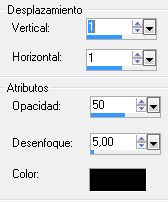
| 23. Efectos/ 3D/ Sombra 1/1/-1/-1 Effects / 3D / Shade 1/1/-1/-1 |
|
24. Capas/ Nueva capa de trama. Layers / New Raster Layer. Selecciones/ Seleccionar todo. Selections / Select All. |
25. Abrimos la imagen del trabajo hecho y deshacemos la redimensión. Open the image and undoing the work done resizing. |
26. Copiar/ Pegar en la selección. Copy / Paste into selection. Selecciones/ Anular selección. Selections / Cancel selection. |
27. Con la herramienta borrador eliminamos al niño de la capa. With the eraser tool remove the child from the layer. |
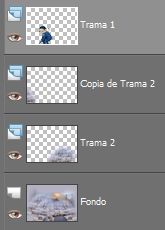
28. Capas/ Duplicar. Layers / Duplicate. Llevamos al fondo para cubrir el hueco que nos queda. We fund to bridge the gap we have left. Duplicamos de nuevo. Doubled again. Fusionar estas dos capas y duplicar. Merge these two layers and duplicate. |
|
30. Abrir el tube PoochFriends. Open PoochFriends tube. Redimensionar 60% Copiar/ Pegar como nueva capa. Resize 60% Copy / Paste as new layer. Colocar. Place. |
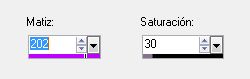
31. Abrir el tube me claus and effect-18-mull. I open the tube and effect claus-18-mull. Redimensionar 40%. Resize 40%. Copiar/ Pegar como nueva capa. Copy / Paste as new layer. Colocar. Place. Ajustar/ Matiz y Saturación/ Colorear, mismos valores anteriores. Adjust / Hue and Saturation / Colorize, values above. Opacidad 80% Opacity 80% |
32. Capas/ Nueva capa de trama. Layers / New Raster Layer. Escribir texto si se desea. Write text if desired. Font Shimmer. Font Shimmer. Color #453d50 Tamaño 30 pixeles. Size 30 color # 453d50 pixels. |
33. Capas/ nueva capa. Layers / New Layer. Añadir su firma. Add your signature. |
| 34. Capas/ Fusionar todo. Layers / Merge all. |
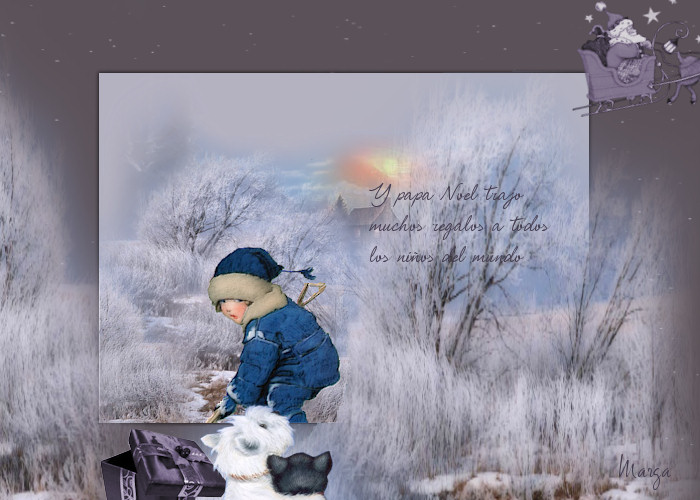
| 36. Aquí termina su trabajo. Here ends your work. Lo guardamos en formato JPG Rioja save in JPG format |
Marga, 18 Diciembre 07 Marga, 18 December 07 |
 |
 |