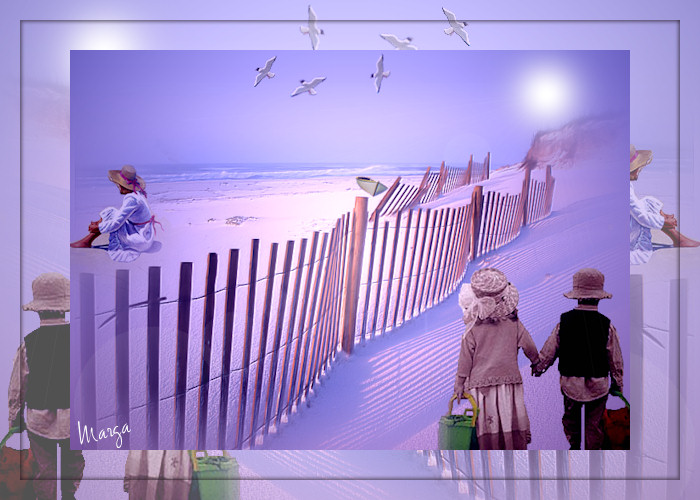
Atardecer en la playa Sunset on the Beach
|
| |
Material Material |  |
Filtros Filters | FM Tille Tools FM Tille Tools |
ColorRave |

Este tutorial fue hecho con el Psp X2, puede hacerlo con cualquier versión del Psp This tutorial was done with the Psp X2, you can do it with any version of Psp |
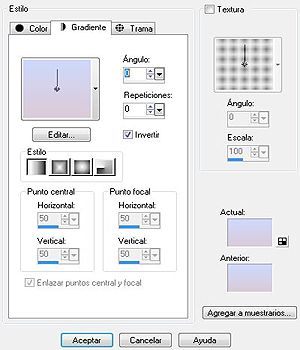
1. Paleta de estilos y texturas. Palette of styles and textures. Primer plano #ced8fb y plano de fondo #dbcad7. Foreground and flat ced8fb # # dbcad7 background. Gradiente. Gradient. Lineal. Linear. Ángulo y repeticiones 0. Angle and repetitions 0. Invertir. Invest. |
|
2. Abrir una imagen transparente de 700 x 500 pixeles. Opening a transparent image of 700 x 500 pixels. La llenamos con el gradiente. The packed with the gradient. |
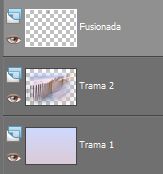
3. Capas/ Nueva capa de trama. Layers / New layer of fabric. Selecciones/ Seleccionar todo. Selections / Select All. |
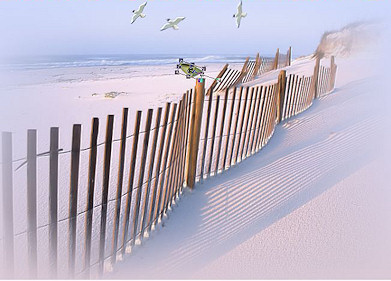
4. Abrir tube 67* "Art Desing". Open tube 67 * "Art Desing. Copiar/ Pegar en la selección. Copy / Paste in the selection. Colocar. Placing. |
5. Selecciones/ Anular selección. Selections / Cancel selection. |
6. Efectos/ Plugins/ FM Tille Tools, valores por defecto. Effects / Plugins / FM Tille Tools/ Blend Emboss, defaults.
|
7. Mejorar foto/ Eliminación de ruido en un paso. Improve photo / Elimination of noise in one step. |
8. Abrir tube klflyinggull1*. Open Tube klflyinggull1 *. Con la herramienta lazo tomar la que interese. With the tool to take the bond interest. |
9. Copiar/ Pegar como nueva capa. Copy / Paste as a new layer. Redimensionar al 30%. Resize at 30%. Duplicar. Duplicate. Colocar. Placing. |
10. Capas/ Fusionar/ Fusionar visibles. Layers / Merge / Merge visible. |
|
11. Duplicar la capa fusionada. Duplicate the layer merged. Colocar. Placing. Duplicar. Duplicate. Colocar. Placing. Ayudarse de la herramienta selección "K" para variar la dirección del vuelo. Ayudarse the tool selection "K" to change the direction of flight. |
12. Abir tube oceandory_gbodCherylmar07. Abir oceandory_gbodCherylmar07 Tube. Copiar/ Pegar como nueva capa. Copy / Paste as a new layer. Redimensionar al 10%. Resize to 10%. |
13. Con la Herramienta selección "K" ladear la barca. With the tool selection "K" ladear the boat. Colocar. Placing. |
|
14. Efectos/ Plugins/ FM Tille Tools, valores por defecto. Effects / Plugins / FM Tille Tools/ Blend Emboss, defaults. |
15. Abir tube chicos1. Abir chicos1 Tube. Copiar/ Pegar como nueva capa. Copy / Paste as a new layer. Redimensionar al 85%. Resize to 85%. Colocar abajo a la derecha. Place bottom right. |
16. Abrir tube descanso. Open Tube rest. Copiar/ Pegar como nueva capa. Copy / Paste as a new layer. Redimensionar al 85%. Resize to 85%. Colocar sobre la arena. Put on the sand. |
17. Capas/ Fusionar/ Fusionar todo aplanar. Layers / Merge / Merge flatten everything. |
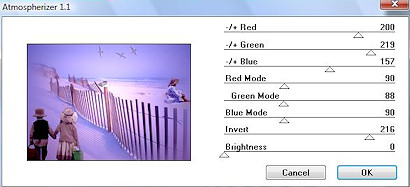
18. Efectos/ Plugins/ ColorRave/ Atmospherizer 1.1 Effects / Plugins / ColorRave / Atmospherizer 1.1 |
|
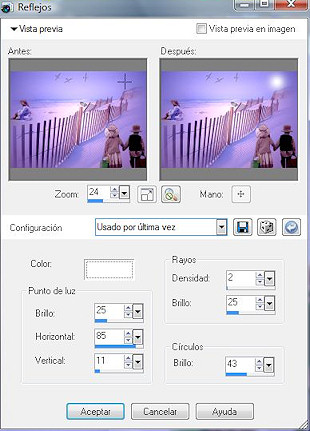
19. Efectos/ Efectos de iluminación/ Reflejos Effects / Lighting Effects / Reflections |
|
20. Capas/ Capa duplicar. Layers / double layer. |
21. Redimensionar al 85% Resize 85% |
| 22. Situarse en la capa de fondo. Situarse in the background layer. Imagen/ Espejo. Picture / Mirror. Opacidad 70% Opacity 70% |
23. Capas/ Fusionar/ Fusionar todo aplanar. Layers / Merge / Merge flatten everything. |
24. Selecciones/ Seleccionar todo/ Modificar/ Contraer 20 Selections / Select All / Modify / 20 Collapse |
25. Selecciones/ Invertir. Selections / Investing. |
| 26. Efectos/ Efectos 3D/ Sombra 2/2 -2/-2 color #1c1218 Effects / Effects 3D / Shade 2 / 2 -2/-2 color # 1c1218 |
| 27. Capas/ nueva capa. Layers / new layer. Añadir su firma. Add your signature. |
| 28. Capas/ Fusionar todo. Layers / Merge everything. |
| 29. Imagen redimensionar al 85% Image resizing 85% |
30. Aquí termina su trabajo. Here finishes its work. Lo guardamos en formato JPG The store in JPG |
Atardecer en la playa Sunset on the Beach |
Marga, 27 Enero 08 Marga, 27 January 08 |
 |
 |