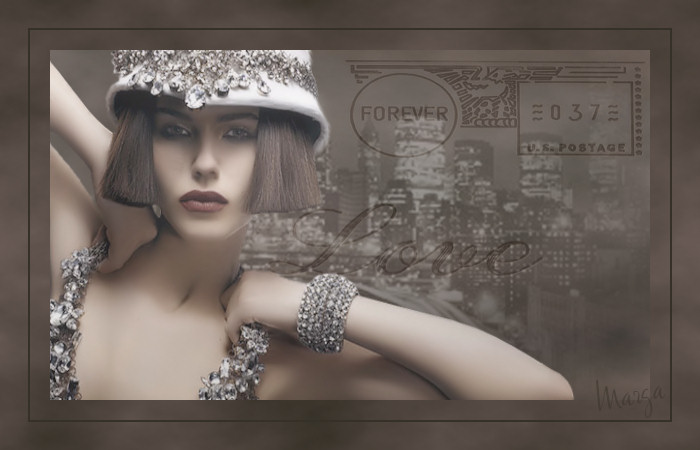
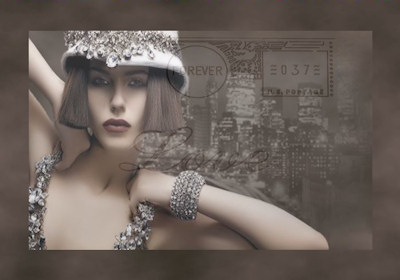
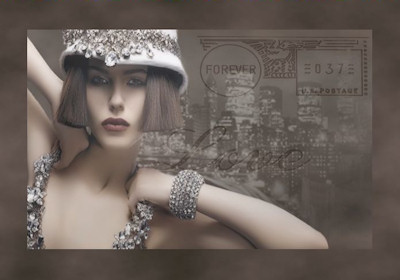
Este tutorial fue hecho con el Psp X2, puede hacerlo con cualquier versión del Psp This tutorial was done with the Psp X2, you can do with any version of Psp |
|
1. Abrir una imagen transparente de 700 x 450 pixeles. Open a transparent image of 700 x 450 pixels. Con el bote de pintura la llenaremos de color #6a5b56 With the pot of painting the colorful # 6a5b56 |
| 2. Capas/ Nueva capa de trama. Layers / New layer of fabric. Selecciones/ Seleccionar Todo. Selections / Select All. |
| 3. Abrir Tube MANHATTAN BY NIGHT MDZ MIST. Open Tube Manhattan by night MDZ MIST. |
| 4. Copiar/ Pegar en la selección. Copy / Paste in the selection. |
| 5. Selecciones/ Anular Selección. Selections / Cancel Selection. |
| 6. Mejorar Foto/ Eliminación de ruido en un paso. Improve Photo / Elimination of noise in one step. |
| 7. Opacidad de la capa 40% Opacity of the layer 40% |
| 8. Capas/ Nueva capa de trama. Layers / New layer of fabric. |
| 9. Selecciones/ Seleccionar Todo. Selections / Select All. |
| 10. Abrir Tube Metallove. Open Tube Metallove. |
| 11. Copiar/ Pegar en la selección. Copy / Paste in the selection. |
| 12. Selecciones/ Modificar/ Contraer 50 pixeles. Selections / Modify / Collapse 50 pixels. Selección Invertir. Invert Selection. Suprimir "Supr". Delete "Delete". |
| 13. Opacidad de la capa 20% Opacity of the layer 20% |
| 14. Capas/ Nueva capa de trama. 14. Layers / New layer of fabric. |
| 15. Con el bote de pintura llenaremos la selección de color #6a5b56 15. With the pot of paint fills the color selection # 6a5b56 |
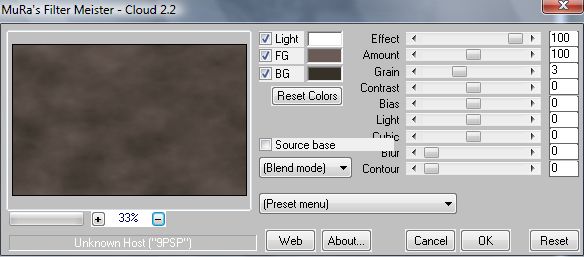
| 16. Efectos/ Plugins/ MuRa's Meister/ Cloud Effects / Plugins / Murad's Meister / Cloud |
|
| 17. Selecciones/ Seleccionar todo 17. Selections / Select All |
| 18. Selecciones/ Modificar/ Contraer 50 pixeles. Selections / Modify / Collapse 50 pixels. |
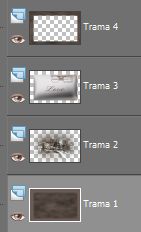
| 19. Situarse en la capa de trama1 Position yourself on the layer trama1 |
|
| 20. Efectos/ Plugins/ MuRa's Meister/ Cloud. Effects / Plugins / Murad's Meister / Cloud. Mismos valores usados anteriormente. Same values used previously. |
| 21. Selecciones/ Anular selección. 21. Selections / Cancel selection. |
| 22. Abrir Tube Berna_Womans_30_2008 Open Tube Berna_Womans_30_2008 |
| 23. Copiar/ Pegar como nueva imagen. Copy / Paste as a new image. |
| 24. Herramientas/ Pincel clonar. Tools / Brush clone. Disimular la marca del rostro. Conceal the mark of the face. |
| 25. Mejorar Foto/ Eliminación de ruido en un paso. Improve Photo / Elimination of noise in one step. |
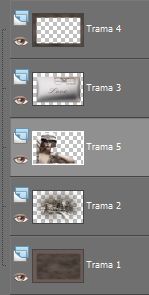
26. Capas/ Organizar. Layers / Organize. |
|
27. Situarse en la capa de trama3 Position yourself on the layer trama3 |
28. Capas/ Duplicar. Layers / Duplicate. Colocar ambas capas. Put the two layers. |
|
| 29. Capas/ Nueva capa de trama Layers / New layer of fabric |
| 30. Selecciones/ Seleccionar todo. Selections / Select All. |
| 31. Selecciones/ Modificar/ Contraer 30 pixeles. Selections / Modify / Collapse 30 pixels. |
| 32. Con el bote de pintura llenaremos la selección de color #363128 32. With the pot of paint fills the selection of color # 363128 |
| 33. Selecciones/ Seleccionar todo. Selections / Select All. Selecciones/ Modificar/ Contraer 28 pixeles. Selections / Modify / Collapse 28 pixels. |
| 34. Selecciones/ Invertir. Selections / Investing. Suprimir "Supr". Delete "Delete". |
| 35. Capas/ Nueva capa de trama. 35. Layers / New layer of fabric. Añadir su firma. Add your signature. |
36. Capas/ Fusionar todo. Layers / Merge everything. |
37. Aquí termina su trabajo. Here finishes his work. Lo guardamos en formato JPG What we keep in JPG |
|
Manhattan |
Marga, 5 Septiembre 08 Marga, 5 September 08 |
|
|
|
|
|
|
|