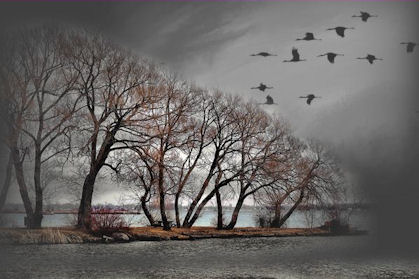
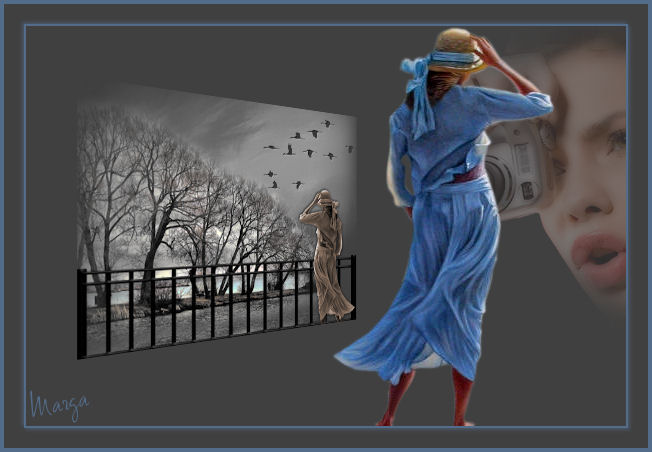
Fotografía Photography
|
| |
Material Material |  |
Filtros Filters | FM Tile Tools FM Tile Tools |
Andromeda | |
Xero |

Este tutorial fue hecho con el Psp X2, puede hacerlo con cualquier versión del Psp This tutorial was done with the PSP X2, you can do with any version of Psp |
1. Abrir una imagen transparente de 600 x 400 pixeles. Open a transparent image of 600 x 400 pixels. Con el bote de pintura la llenaremos de color #404040 With the pot of paint fills it with color # 404040 |
2. Abrir el tube katussia_f407 Copiar/ Pegar como nueva capa. Colocar. 2. Open tube katussia_f407 Copy / Paste as new layer. Place. |
3. Capa duplicar. Double layer. Voltear. Flip. Colocar en la parte inferior. Place on the bottom. |
4. Capa duplicar. 4. Double layer. Voltear. Flip. Colocar pegada a la anterior. Bring glued to it. |
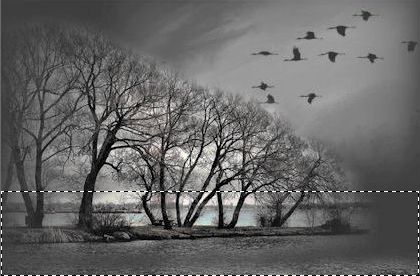
5. Abrir el tube mds7100 Birds. Open tube mds7100 Birds. Copiar/ Pegar como nueva capa. Copy / Paste as new layer. |
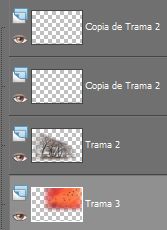
6. Capas/ Ordenar/ Bajar (hasta llegar al lugar correspondiente) Layers / Order / Download (up to the spot) |
|
7. Modo de mezcla/ Luminosidad heredado. Blend Mode / Brightness inherited. |
8. Con el pincel clonar haremos "desaparecer" el ave que queda entre las ramas. With the clone brush will "disappear" the bird that is among the branches. |
|
9. Efectos/ Plugins/ FM Tile Tools/ Valores por defecto Effects / Plugins / FM Tile Tools / Defaults |
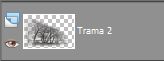
10. Nos situamos y marcamos la trama 2 We are the fabric and mark 2 |
|
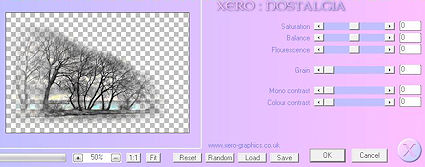
11. Efectos/ Plugins/ Xero/ Nostalgia Effects / Plugins / Xero / Nostalgia |
|
12. Con la herramienta Selección trazar un rectángulo. With the Selection tool to draw a rectangle.
|
13. Capas/ Nueva capa de trama. Layers / New Raster Layer. Abrir el tube sd_fence09 Copiar/Pegar en la selección. Open tube sd_fence09 Copy / Paste into selection. Colocar. Place. |
14. Abrir el tube FBR_Reflection. 14. Open FBR_Reflection tube. Redimensionar al 70%. Resize to 70%. |
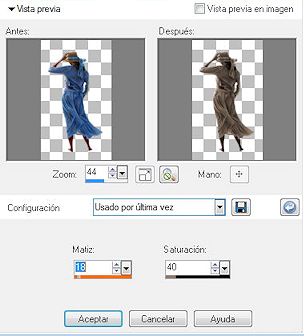
15. Ajustar/ Matiz y saturación/ Colorear Adjust / Hue and Saturation / Colorize |
|
16. Copiar/ Pegar como nueva capa. Copy / Paste as new layer. Colocar. Place. |
17. Ajustar/ Nitidez/ Enfocar. Adjust / Sharpness / Sharpen. |
18. Capas/ Fusionar/ Fusionar todo aplanar. Layers / Merge / Merge all flatten. |
19. Redimensionar al 75%. Resize to 75%. Copiar. Copy. |
20. Archivo/ Nuevo/ Nueva imagen 600 x 400 Llenar con el bote de pintura #404040 File / New / New Image 600 x 400 Fill the pot with paint # 404040 |
21. Pegar como nueva capa. Paste as new layer. |
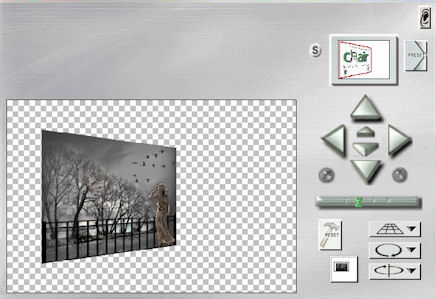
22. Efectos/ Plugins/ Andromeda/ Perspective Effects / Plugins / Andromeda / Perspective |
|
23. Colocar. Place. |
| 24. Abrir el tube misted_by edmara v md face 2006. Open tube misted_by executioner v md face 2006. Redimensionar al 90% Resize to 90% |
25. Copiar/ Pegar como nueva capa. Copy / Paste as new layer. Opacidad 30% Opacity 30% |
26. Abrir el tube FBR_Reflection. Open FBR_Reflection tube. Copiar/ Pegar como nueva capa. Copy / Paste as new layer. Colocar. Place. |
27. Ajustar/ Nitidez/ Enfocar. Adjust / Sharpness / Sharpen. |
| 28. Capas/ Fusionar/ Fusionar todo aplanar. Layers / Merge / Merge all flatten. |
| 29. Imagen/ Agregar bordes 2 #536c8a Image / Add borders 536c8a # 2 |
| 30. Imagen/ Agregar bordes 20 #404040 Image / Add borders 20 # 404040 |
| 31. Imagen/ Agregar bordes 4 #536c8a Image / Add borders 536c8a # 4 |
32. Selecciones/ Seleccionar todo/ Modificar/ Contraer 24 Selections / Select All / Modify / Contract 24 |
33. Efectos/ 3D/ Sombra 2/2 y -2/-2 color #536c8a Effects / 3D / Shadow 2 / 2 and -2/-2 color # 536c8a |
34. Capas/ Nueva capa. Layers / New Layer. Añadir su firma Add your signature |
35. Capas/ Fusionar todo Layers / Merge all |
| 36. Imagen/ Redimensionar 85% Image / Resize 85% |
Fotografía Photography |
Marga, 9 Noviembre 2007 Marga, 9 November 2007 |
 |
 |